
YoloClb app case study · UI/UX design
How we designed YoloClb, a challenge app that turns goals into games
Throw a challenge. Pick a reward. Earn credits. Repeat.
YoloClb started as an idea: what if pushing yourself felt like a dare between friends? We took it from a blank page to launch, designing the challenge flow, a credits economy and personal rewards, with Scotty the astronaut cheering users on at every step.
Brand identity by CGAlive · See the YoloClb logo case study →
Meet Scotty · brand mascot
You only live once
Client
YoloClb
Category
Challenge App
Project
First Build · Idea to Launch
Scope
UX · UI · Gamification
Timeline
4 Weeks
The brief
Make Finishing a Goal Feel Like Winning a Game
Setting goals is easy. Sticking to them is not. YoloClb wanted an app that gives people a reason to finish, and friends to keep them honest.
The Hard Part
- Goals are easy to set and just as easy to drop
- Doing it alone gets boring fast, with no one to cheer or tease you
- Nothing at stake, so skipping a day costs nothing
- A new app with too many features could bury the one thing that matters: the challenge
What Success Looked Like
- Start a challenge in a few taps, from any screen
- Something at stake: credits you spend and win back
- A reward people actually want, chosen by them
- Friends who can throw challenges at each other
Design principles
Four Rules Every Screen Had to Follow
01
The challenge comes first
Every screen leads back to starting, tracking or finishing a challenge.
02
Put something at stake
Throwing a challenge costs credits. Finishing it wins them back, and more.
03
Rewards people want
Users pick their own prize, from shoes to a spa day, before they begin.
04
Friends make it stick
Challenge a friend or share yours on WhatsApp in one tap.
People don't need more goals. They need a reason to finish them.
From idea to launch
One Idea. Six Steps. A Challenge App Ready to Ship.
We designed the rules of the game before we designed a single screen.
Every flow tested with real users before handover
Understand the itch
Workshops with the founders and conversations with target users about why goals fail, and what would make them try harder.
Design the credits economy
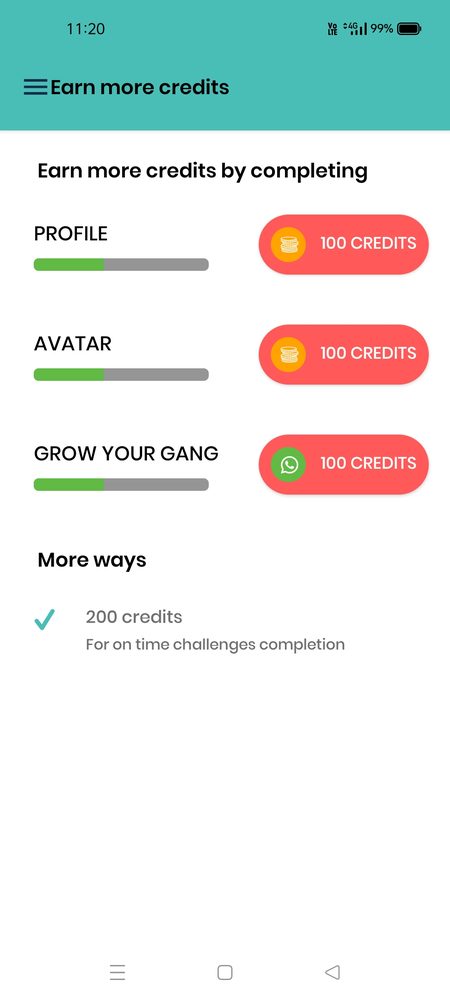
How many credits a challenge costs, what finishing pays, and how profile, avatar and invites earn more, balanced so the game stays fair.
Map every journey
Throw a challenge, pick a reward, update progress, win, share. Each flow mapped and cut down to the fewest possible steps.
Bring it to life
A bright, playful interface with coral actions, teal headers and Scotty showing up at the moments that deserve a celebration.
Play-test it
Clickable prototypes in the hands of real users. We watched where they hesitated and fixed it before development started.
Ship it
Dev-ready designs, a component library and interaction specs, so the build matched the prototype screen for screen.
Key screens
From "I'm in" to "I did it" in Three Screens
The core loop, exactly as it ships in the app.
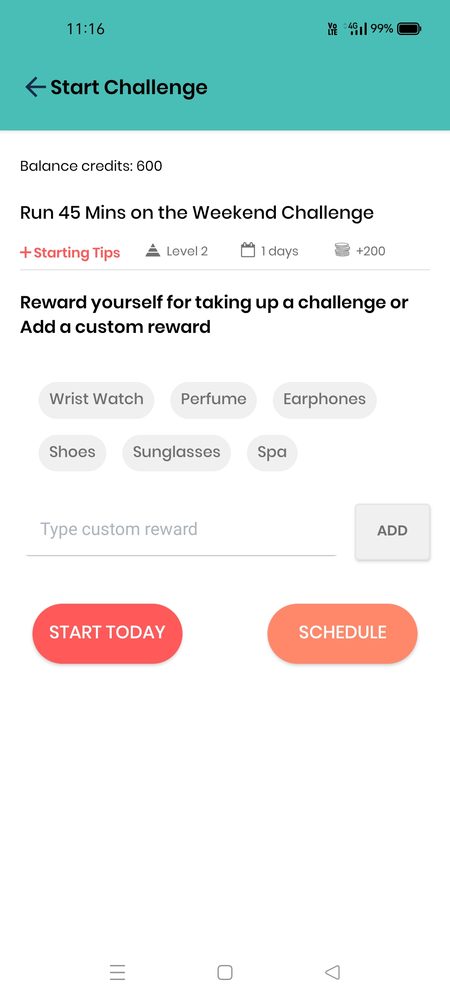
Pick a reward, then start
Before a challenge begins, users choose their own prize, from earphones to a spa day, or type a custom one. Then it's Start Today or Schedule.
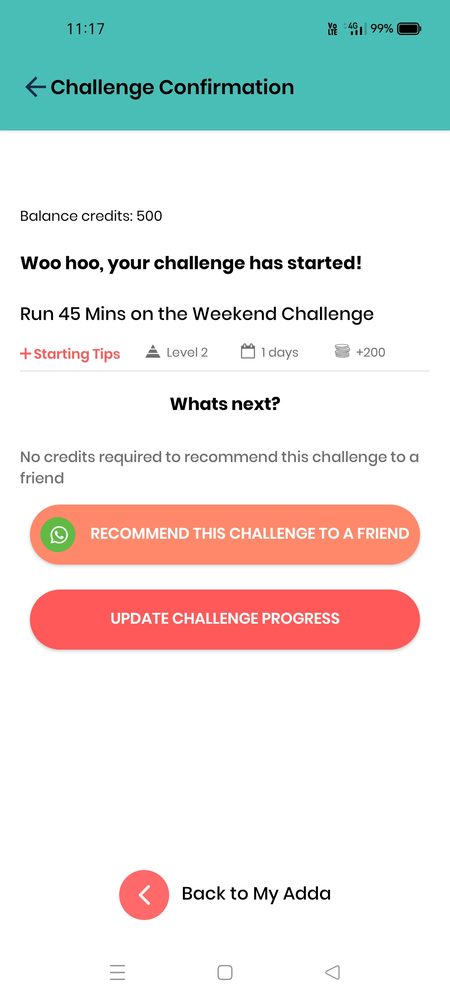
Bring a friend along
The moment a challenge starts, users can recommend it to a friend on WhatsApp for free, turning every challenge into a reason to invite someone.
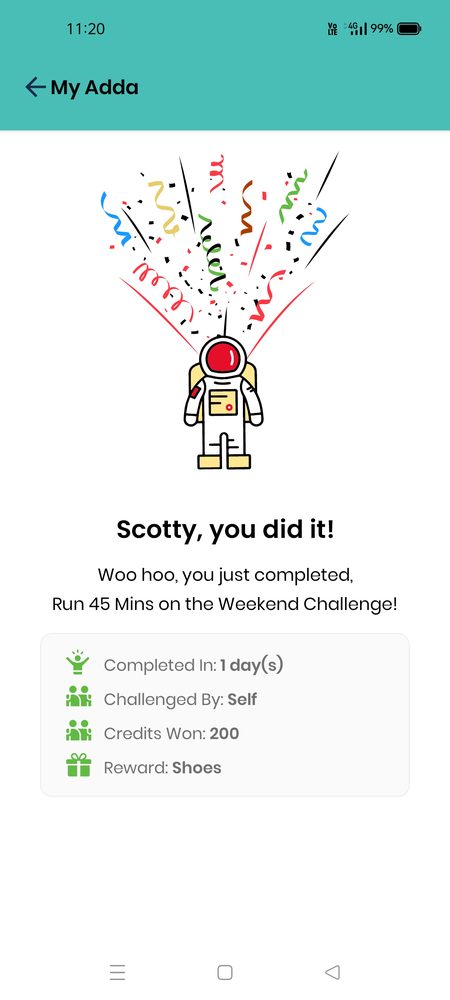
Celebrate every win
"Scotty, you did it!" Confetti, the time taken, credits won and the reward unlocked, all in one screen worth screenshotting.
Gamification
Yolo Credits: A Small Bet on Yourself
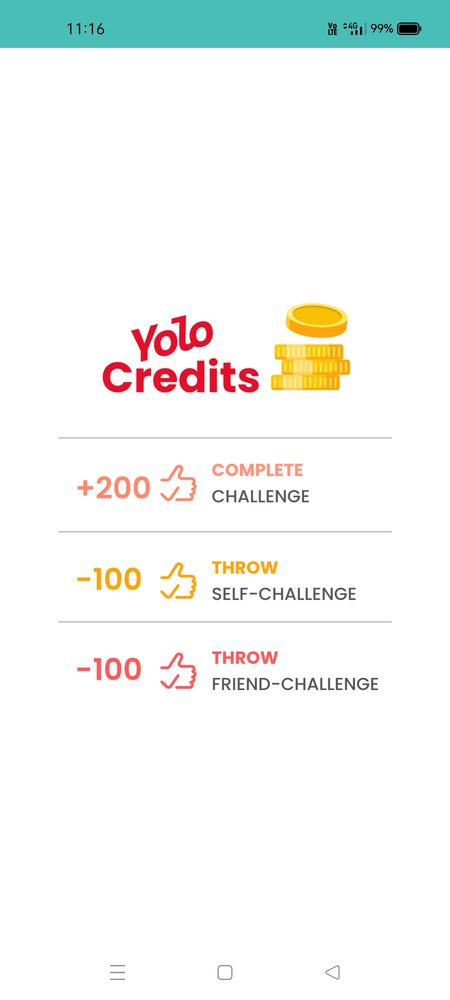
Credits give every challenge stakes. Spend them to throw a challenge, win them back by finishing, and earn more by growing your gang.
How credits move
Credits
Spend
Win & earn
Finishing pays back twice what a challenge costs, so the game rewards people who follow through.
Design system
Playful on the Surface. Consistent Underneath.
A shared library so every new challenge type looks and works like YoloClb from day one.
Colour
Type
Aa
Poppins throughout: round, friendly and easy to read at a glance, even in a big number like +200.
Scotty moments
6
- Splash · "Scotty reporting!"✓
- Challenge won✓
- Empty states✓
- Errors & offline✓
The result
A Community That Keeps Challenging Itself
Since launch, live in the app.
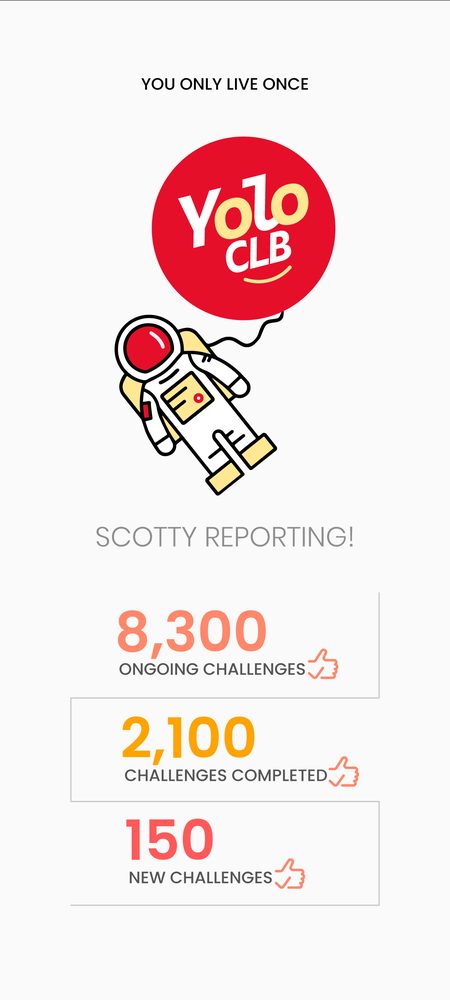
8,300
Ongoing challenges being played right now.
2,100
Challenges completed, each with a reward unlocked.
150
New challenges created by the community.
Challenge completion
+18 pts
40%
58%
Users who invite a friend
+11 pts
20%
31%
Day-30 retention
+9 pts
25%
34%
The impact
What the Design Made Possible
✓
Growth built into the game
Friend challenges and WhatsApp sharing mean every active user is also a reason for someone new to join.
✓
Follow-through that pays
Credits and personal rewards give people a real reason to finish what they start, not just sign up.
✓
Ready to grow
A shared design system lets YoloClb add new challenge types and features without starting from scratch.
Takeaways
Lessons for Challenge and Community Apps
What worked for YoloClb works for any app that needs people to show up, follow through and bring friends.
−100 → +200Spend to start, win double to finish. A simple rule that makes follow-through worth it.
5 questions · 2 minutes
Building an app or portal?
Take our free UX health check and see which of these lessons apply to your product.
- 01
Design the rules before the screens
Decide what users spend, win and unlock first. Good screens can't fix a game that isn't fun.
- 02
Let users choose the prize
A reward someone picked themselves motivates far more than a badge they never asked for.
- 03
Build sharing into the moment
Ask people to invite a friend right after they commit, when they're most excited, not buried in settings.
- 04
Celebrate loudly
A win screen with confetti and a mascot turns a finished task into something people want to screenshot and share.
- 05
Keep the core action one tap away
In a challenge app, starting a challenge should never be more than a tap or two from anywhere.
FAQ
Frequently Asked Questions
1. Can you design an app starting from just an idea?
Yes. YoloClb started as a concept. We help shape the idea into user journeys, game rules and screens, then hand over designs your developers can build from.
2. How do you design gamification that doesn't feel gimmicky?
We start with the behaviour you want, like finishing a challenge, and design rewards that make that behaviour worth it. Points and badges only work when they're tied to something people care about.
3. How long does it take to design a new app?
Most first builds take 1–2 weeks of design, depending on the number of flows and test rounds. We share a clear timeline after the first call.
4. Do you design for both Android and iOS?
Yes. We design one shared system that respects each platform's conventions, so the app feels native on both.
5. What do developers receive at handover?
Dev-ready design files, a component library, colour and spacing specs, interaction notes and exported assets, plus a walkthrough with your development team.